
Empowering young coders with MIT Scratch
Scratch, developed by the MIT Media Lab, is a free, web-based platform that introduces programming in a fun and accessible way. With its visual programming approach, this education app utilizes drag-and-drop blocks to simplify coding concepts such as loops, variables, and conditionals. The platform encourages creativity and collaboration, making it a widely used educational tool for learners exploring the digital world.
Top Recommended Alternative

Making programming easy to start
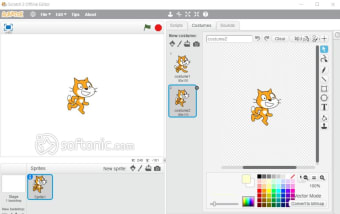
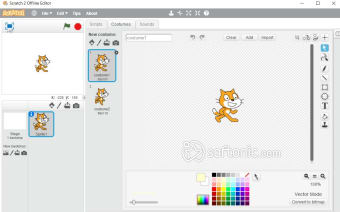
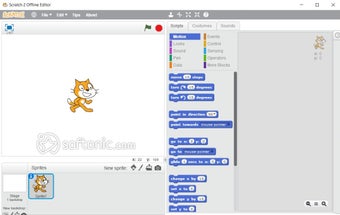
One of the most notable aspects of Scratch is its user-friendly drag-and-drop interface. By using color-coded blocks to represent different programming actions, users can manipulate sprites to create animations, stories, or games. This visual approach makes programming concepts easier to understand for beginners.
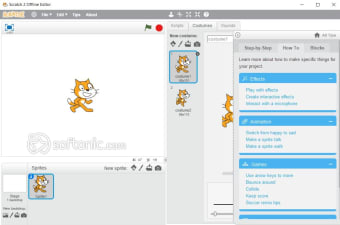
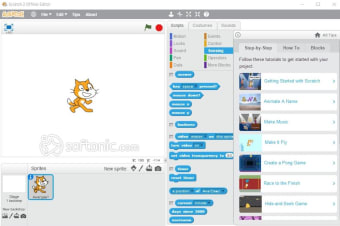
Additionally, built-in tutorials provide step-by-step guidance, helping users develop foundational programming and problem-solving skills. However, Scratch is not designed for advanced coding learners, as it focuses on block-based programming rather than text-based languages.
A thriving community for collaboration
Scratch includes a large online community where participants can share their projects with others. Community members can view, comment on, and remix creations, providing opportunities for inspiration and collaboration. This exchange of ideas encourages learners to explore new possibilities and improve their projects while connecting with people who share an interest in creativity and programming.
Expanded educational resources and learning paths
Scratch continues to evolve as an educational platform by introducing more interactive tutorials, guided activities, and classroom resources for students and teachers. Recent improvements expanded the platform’s library of coding challenges and project ideas, helping beginners learn concepts like animation, storytelling, and game design step by step. Educators also benefit from enhanced teaching materials that support coding lessons in schools, coding clubs, and remote learning environments, making Scratch even more adaptable for structured educational programs.
Improved accessibility and device compatibility
Recent updates have focused on making Scratch more accessible across different devices and learning environments. The platform now delivers better support for Chromebooks, tablets, and modern web browsers, ensuring smoother performance for younger users in classrooms and at home. Accessibility improvements, including clearer navigation and interface refinements, help learners of different skill levels interact with projects more comfortably. These updates reinforce Scratch’s mission of making programming approachable to as many people as possible worldwide.
Creative extensions and hardware integration
Scratch has expanded its functionality through extensions and hardware connectivity tools that introduce learners to more advanced forms of interactive programming. Users can now connect Scratch projects with devices such as micro:bit controllers, LEGO robotics kits, and Makey Makey boards to create interactive experiments, games, and physical computing projects. These integrations encourage hands-on creativity while teaching users how software can interact with real-world devices in exciting and educational ways.
Safe and collaborative
The Scratch online community remains one of the platform’s strongest features. Continuous moderation improvements and updated community guidelines help maintain a safe and supportive environment for younger users to share projects and collaborate creatively. Students can remix games, animations, and stories made by others while learning how programming ideas work in practice. This collaborative ecosystem encourages experimentation, teamwork, and confidence-building as learners develop both technical and creative skills together.
A creative gateway
Scratch remains one of the most effective tools for introducing beginners to coding thanks to its blend of visual learning, creative freedom, and community-driven collaboration. Its ongoing improvements in accessibility, educational content, and hardware integration continue to make the platform engaging for both classrooms and independent learners. While it is not intended for advanced software development, Scratch succeeds remarkably well as a foundation for computational thinking, problem-solving, and digital creativity for young coders around the world.
Inspiring creativity through coding
In conclusion, Scratch stands out as an excellent starting point for anyone interested in coding. With its colorful blocks and simple drag-and-drop style, anyone can start creating their own games, stories, and animations right away. The friendly online community offers inspiration and support, encouraging learners to share and explore together. Scratch is more than just a tool—it’s a playful first step into the world of coding and creativity.